Core concepts
Learn the shared vocabulary and constraints that apply to the ElemBio™ CLI, API, and skills. Read this before diving into any interface-specific docs.
The Element Biosciences system produces sequencing or multiomic run data that lands in a storage connection. A flow schedules an execution of a workflow such as Bases2Fastq™ or Cells2Stats, which writes output files consumed by downstream secondary analysis to a storage connection.
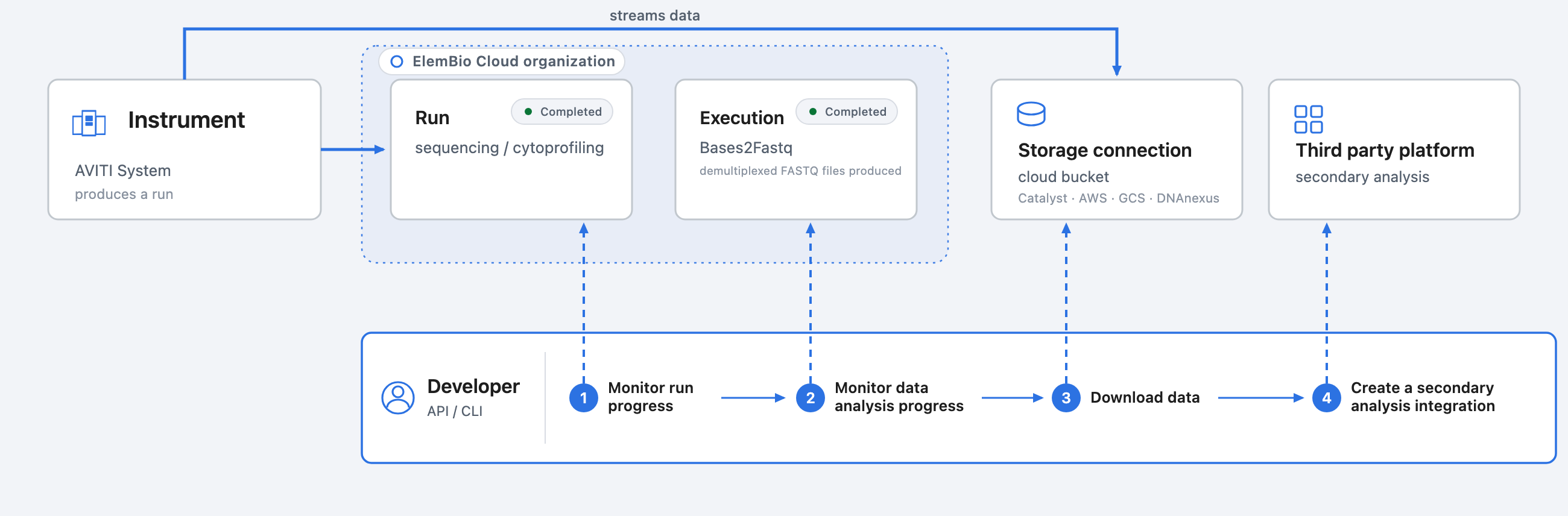
The ElemBio CLI and API are resources to view and interact with your ElemBio Cloud data programmatically. They list and retrieve metadata, download run outputs, and mount data. Runs, flows, and analysis are created and configured only in the ElemBio Cloud.
The instrument pushes run metadata into ElemBio Cloud and streams its data into cloud storage. The API and CLI let you monitor and react to your runs. You can:
- monitor a run's progress, status, and metrics
- check for recently completed runs
- check for completed data analysis
- download or mount the raw run or execution data
- create integrations with third-party secondary/tertiary workflow providers
Key objects
The CLI and API share a common object model. Every endpoint and command operates on one of four core objects.

Runs
A run (either sequencing or multiomics) is the main data object that other objects revolve around. A run contains:
- the setup metadata (for example, sequencing kit, number of cycles)
- basic run metrics (for example, total yield, total reads, %Q30)
- pointers to the other metadata like the originating instrument
- pointers to data storage details for the run such as the
storageConnectionIdanduriwhere the raw run data lives
Executions
An execution is a launched analysis workflow, such as Bases2Fastq or Cells2Stats, tied to a run. It records the status, the exact launch parameters, logs, and the output files it produced. Executions belong to a run.
Storage connections
A storage connection encodes the cloud bucket that your instrument streamed run data into, either a bucket hosted by ElemBio Catalyst™ or your own cloud. Data uploads continuously throughout a run. The connection also mints short-lived, scoped credentials that the CLI uses to download or mount data directly from the underlying object store, so bytes never proxy through the API. A run's output.storageConnectionId links it back to where its data lives.
Instruments
An instrument is a registered Element system, addressed by its serial number. It produces runs and streams their data to storage. Every run names the instrument that produced it in its instrument block.
Accessing key objects
| Resource | Description | API path | CLI command |
|---|---|---|---|
| Runs | Instrument runs and their output files | /v1/runs | elembio runs |
| Executions | Workflow executions (for example, Bases2Fastq) and their outputs | /v1/executions | elembio executions |
| Instruments | Registered instruments | /v1/instruments | elembio instruments |
| Storage connections | Connected cloud storage | /v1/storage-connections | elembio storage |
Identifiers
All unique objects carry a type-prefixed identifier (for example, seq_507f1f77bcf86cd799439011). Instruments are addressed by serial number. Most resources can also be referenced by their human-readable name in the CLI.
Requests and responses
- Authenticate every request with an API key. See Authentication.
- All responses are JSON.
- List endpoints are paginated and filterable. See Pagination and Filtering below.
- Errors use a consistent envelope.
Pagination
- API
- CLI
List responses are cursor-based. Control paging with these query parameters:
| Parameter | Type | Default | Description |
|---|---|---|---|
pageSize | integer | 100 | Maximum results per page (max 1000) |
pageToken | string | — | Token for the page to retrieve |
includeTotalCount | boolean | false | Include totalCount in the response |
When more results exist, the response includes a nextPageToken. Pass it back as pageToken to retrieve the next page:
curl -sSf "https://cloud-api.usw2.elembio.io/v1/runs?pageSize=50&pageToken=<nextPageToken>" \
  -H "x-api-key: $ELEMBIO_API_KEY"
By default, the CLI paginates automatically and returns up to 100 matching objects. Raise the limit with --max-items, or use --max-items 0 to return all matches.
# Return up to 200 objects, requesting 50 objects per API call
elembio runs list --page-size 50 --max-items 200

# Disable automatic pagination and return all results
elembio runs list --max-items 0
Filtering
Many CLI commands and API endpoints support filtering to return only the objects you are interested in. Both interfaces use the same filter syntax, so once you learn it, you can use it everywhere. Specify one or more keyword:value expressions to match object attributes.
| Pattern | Example | Meaning |
|---|---|---|
| Single filter | status:completed | Return completed objects. |
| Multiple filters | status:completed type:sequencing | Return objects matching both filters. |
| Multiple values | status:completed,failed | Return objects matching either value. |
| Comparisons | time_created>=7d | Compare numeric or date fields using >=, <=, >, <, or !=. |
| Dates | time_created>=2026-01-01 | Use ISO 8601 dates or relative times such as 7d or 1mo. |
Common filter keywords include name, id, status, type, and time_created. For example, to return only completed sequencing runs:
- API
- CLI
Pass the expression as a filter query parameter, with spaces URL-encoded as %20:
  curl --get "https://cloud-api.usw2.elembio.io/v1/runs" \
     --data-urlencode "filter=type:sequencing status:completed" \
     -H "x-api-key: $ELEMBIO_API_KEY"
Pass the same expressions through a repeatable --filter flag:
elembio runs list \
  --filter status:completed \
  --filter type:sequencing