Sequencing End-to-End Workflows
Follow a sequencing run from planning and a manifest through FASTQ and optional secondary analysis.
Choose a kit
Choose a kit on the Sequencing Assay Overviews before you plan the run.
| Kit | What it sequences |
|---|---|
| Cloudbreak | Adept™ and Elevate™ libraries |
| Cloudbreak Freestyle | Linear third-party libraries, loaded without library conversion |
| Cloudbreak UltraQ | High-quality Q40 and Q50 data for sensitive assays |
| Trinity | Onboard enrichment for targeted sequencing |
Plan the run
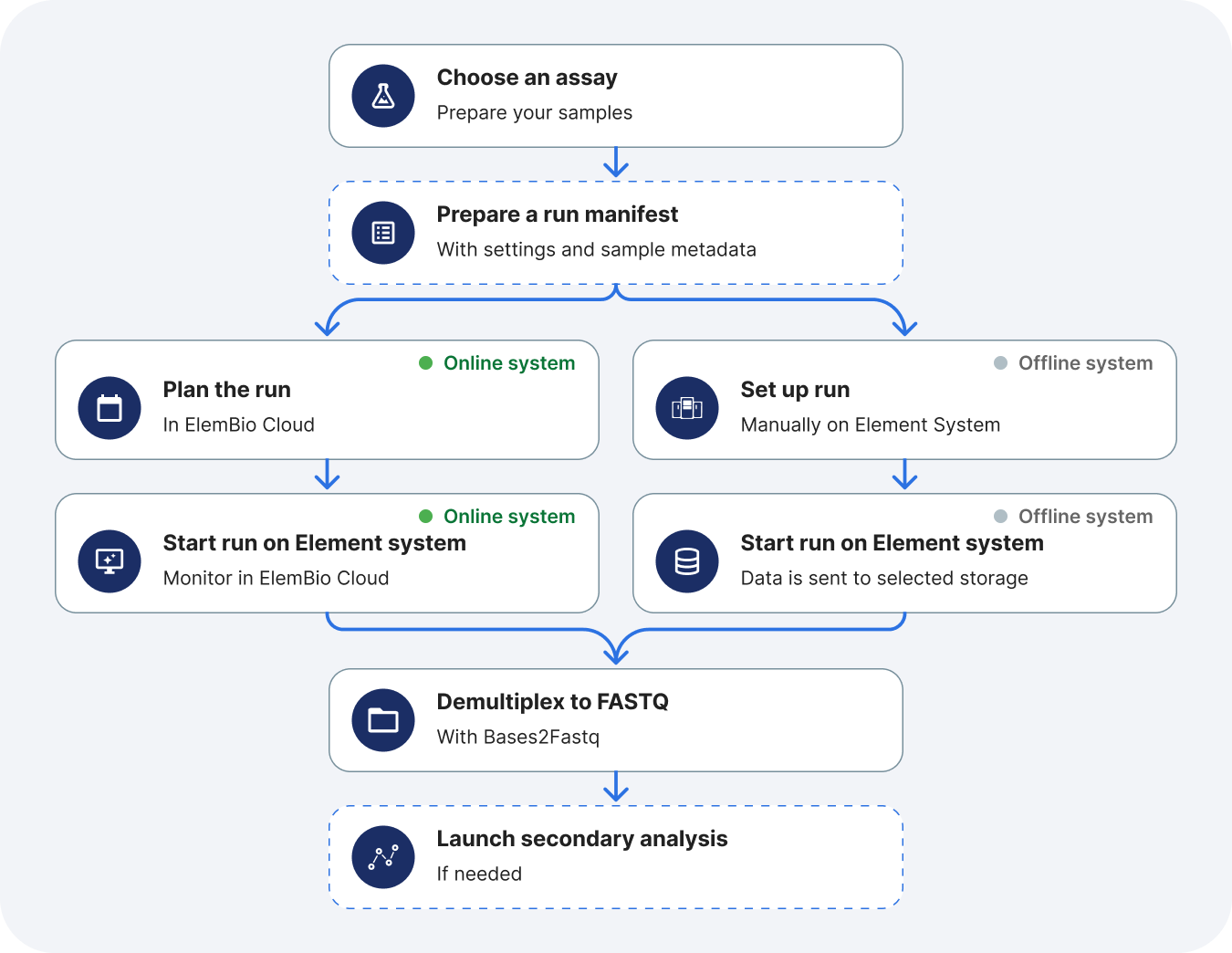
Create the planned run in ElemBio Cloud. Choose the chemistry, library structure, kit, and cycle counts on Run planning for sequencing.
Prepare a manifest
A sequencing manifest names samples, index sequences, and Bases2Fastq™ settings. Prepare a sequencing manifest from a template or a CSV. Upload that file when you plan the run, or place it where the instrument can read it.
Sequence and monitor
After the run starts, follow it in Remote run monitoring. Metric definitions are on Metrics and charts. File layouts are on Run output files.
Demultiplex to FASTQ
Demultiplexing turns base calls into FASTQ files.
- In ElemBio Cloud, run the Bases2Fastq workflow. On ElemBio Catalyst™, set it up as a flow so it can start when the run completes. Track it on Executions.
- On your own compute, install Bases2Fastq and follow Run Bases2Fastq.
Secondary analysis
Skip this step when FASTQ files are the product you need. Germline secondary analysis workflows in ElemBio Cloud are Sentieon Germline DNA and Parabricks Germline DNA.