Prepare a target cell assignment manifest
Prepare a target cell assignment manifest for cytoprofiling runs.
Overview
A target cell assignment manifest is a CSV file that tells the system which spacer (guide RNA) sequences to look for during sequencing. When a run includes at least one target site configured for cell assignment, such as a CRISPR optical pooled screen, the system reads each cell's in situ sequencing data, compares detected sequences against your manifest, and assigns each cell to a dominant spacer.
A target site is the downstream flanking sequence region defined in your Teton Atlas™ custom design. It corresponds to the guide scaffold and is used to inform RT and sequencing primer design. Each target site has a spacer library defined in the target cell assignment manifest that the system sequences and performs automated onboard cell assignment.
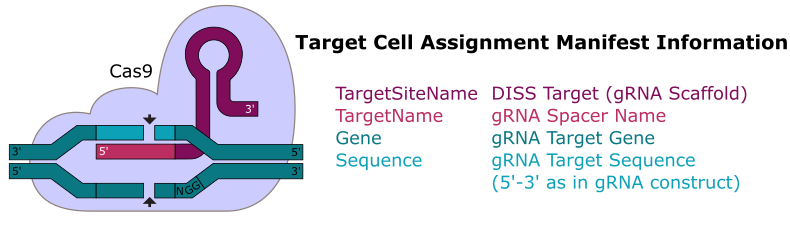
Only the red-highlighted region in the diagram above is required in the target cell assignment manifest.
The manifest works in conjunction with your Teton Atlas custom workflow design, which defines the RT and sequencing primers used to detect each target. You must complete the custom design process and publish the design before uploading this manifest.
Before you begin
Before creating your manifest, confirm the following:
- You have published a Teton Atlas custom workflow design in Custom Designer.
- You know the target site names from your design.
TargetSiteNamevalues in the manifest must match these exactly, including capitalization. - You know the spacer sequence length for each target site. All sequences within a target site must be the same length.
- Your spacer sequences are available in the 5' to 3' orientation as they appear in your guide RNA construct.
Manifest sections
A target cell assignment manifest file includes the following sections. Each section starts with a bracketed section heading that is followed by a row of column headings. Section and column headings are case-insensitive. All subsequent rows list metadata for the section.
- Target site settings: Define per-target-site settings, including an optional
TargetMaskoverride. - Target information: List every spacer sequence the system should recognize, mapped to its target site.
Consult cell assignment logic to understand how the system assigns cells to spacers after the run, including confidence scoring and output metrics.
Start from a template
- Download a template.
- Open the template in Excel or a text editor.
- Edit the template as desired (for example, modify metadata or add columns).
- Save the run manifest as a CSV UTF-8 file.
- Allowed characters in file name are are letters, numbers, dash, dot, parentheses, and underscore.
- Do not include spaces in the file name.
Template manifests
| Downloadable Template | Contents | AVITI OS Version |
|---|---|---|
| Single-Target Cell Assignment Manifest | v3.4.0 and later | |
| Two-Target Cell Assignment Manifest | TargetMask settings applied | v3.4.0 and later |
Create an original file
-
Open a new file in Excel. Or, open an application that can save
.csvfiles. -
Enter any of the following section headings and their column headings:
[TARGET SITE SETTINGS]TargetSiteName,SettingName,Value,[TARGET INFORMATION]TargetSiteName,TargetName,Gene,Sequence -
Add metadata to the Target site settings and Target information sections.
-
Ensure that all spacer sequences under each
TargetSiteNameare identical in length, and that the length matches theTargetMaskconfigured in your custom design. For more information, see Target information. -
Save the target cell assignment manifest as a CSV UTF-8 file.
- Allowed characters in file name are are letters, numbers, dash, dot, parentheses, and underscore.
- Do not include spaces in the file name.