Cytos Cell Screening analysis workflow
The Cytos Cell Screening analysis workflow that turns an AVITI24 cell screening run into aligned, assigned 3' expression data.
The Cytos™ Cell Screening analysis workflow is a Nextflow workflow by Element Biosciences that processes a cell screening run from an AVITI24™ System into spatially resolved gene expression. It combines cell segmentation, demultiplexing, 3' alignment and assignment, and Spatial Data Object (SDO) construction into one pipeline.
On ElemBio Catalyst, this workflow launches automatically when a Multimodal Pooled Screening (MPS) or a 3' Transcriptome run completes, so the required secondary analysis finishes without a manual launch. The workflow can also run independently and reproducibly in any Nextflow environment, local or cloud-based; see Run the workflow for instructions on how to operate the workflow outside of ElemBio Cloud.
Workflow summary
The workflow reads an AVITI24 cell screening run directory and runs the following stages. FASTQ files are routed by assay type, as declared in Panel.json.
| # | Stage | Description |
|---|---|---|
| 1 | Cells2Stats | Performs cell segmentation, resolves spatial coordinates, and generates per-cell statistics and QC. |
| 2 | Bases2Fastq™ | Demultiplexes base calls into FASTQ files per sample, well, and batch. |
| 3 | 3' FASTQ to parquet | Aligns and assigns 3' untargeted reads to produce cell × gene count matrices. See 3' alignment and assignment. |
| 4 | Build SpatialData | Combines spatial data and expression data into a single SpatialData .zarr.zip archive. |
3' alignment and assignment
The 3' stage runs only on FASTQ files from a ThreePrimeUntargeted batch. It performs the following steps:
| Step | Description |
|---|---|
| GTF preprocessing | Annotates the reference GTF and selects the countable gene universe. |
| Generate feature SAF | Builds the counting SAF from the selected features. |
| STAR align | Aligns reads to the reference genome. |
| Tag cell BAM | Adds cell barcode tags to the aligned reads. |
| featureCounts | Assigns reads to genes and features. |
| BAM to parquet | Converts the assigned BAM files to parquet. |
| Categorize read assignments | Classifies reads into gene and feature tiers. |
| Process read assignments | Generates the cell × gene count matrices. |
| Collect sample metrics | Reports per-sample SAF on-target metrics. |
Set up the workflow in ElemBio Cloud
Add the workflow as a flow from the Workflow Library. The flow saves the parameters and the output location, so later launches reuse them.
-
In ElemBio Cloud, expand Analysis and select Workflow Library.
-
On the Cell Screening Multiomics card, select Add a Flow.
-
Complete the shared flow steps. For details, see Add a flow.
-
In the Parameters step, review the arguments. Leave a field empty to keep its default, such as the default Element GTF for the selected genome.
Note:The flow setup currently supports only the GRCh38 reference genome. To use a different reference, run the Nextflow workflow locally.
-
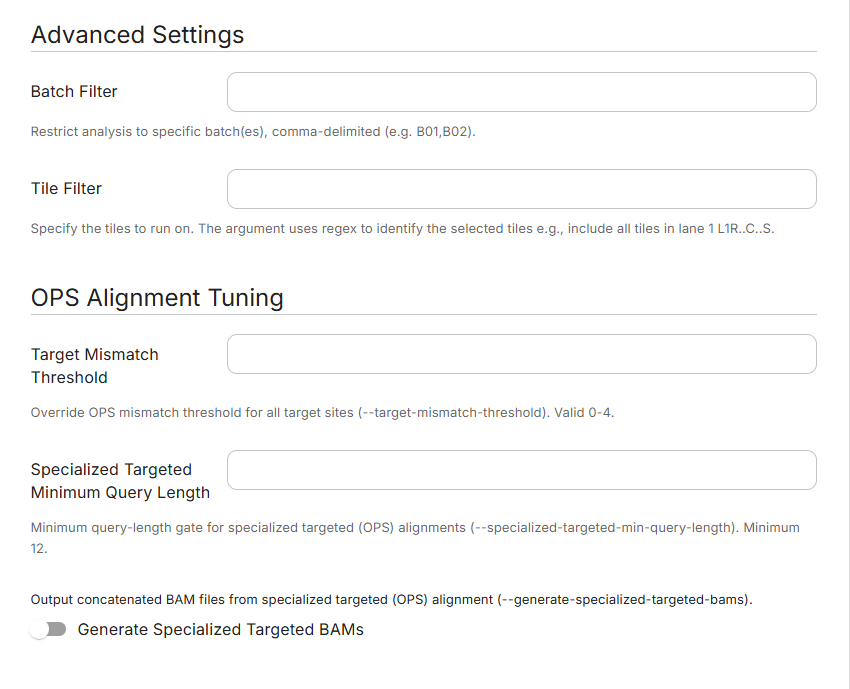
(Optional) Under Advanced Settings, restrict the batches with Batch Filter or the tiles with Tile Filter. Under OPS Alignment Tuning, tune OPS alignment with Target Mismatch Threshold, Specialized Targeted Minimum Query Length, and Generate Specialized Targeted BAMs.
-
Select Save.
For each field, see Input parameters.
On ElemBio Catalyst™, run data in the Runs bucket is immutable. The workflow reads the run directory but cannot change it. Results go to the Analysis bucket, which is set up with the flow as its output location. Access results from the Executions page or the Data Explorer.
Launch the workflow on a run
After you save the flow, launch it on a completed run from the run's Run Details page.
-
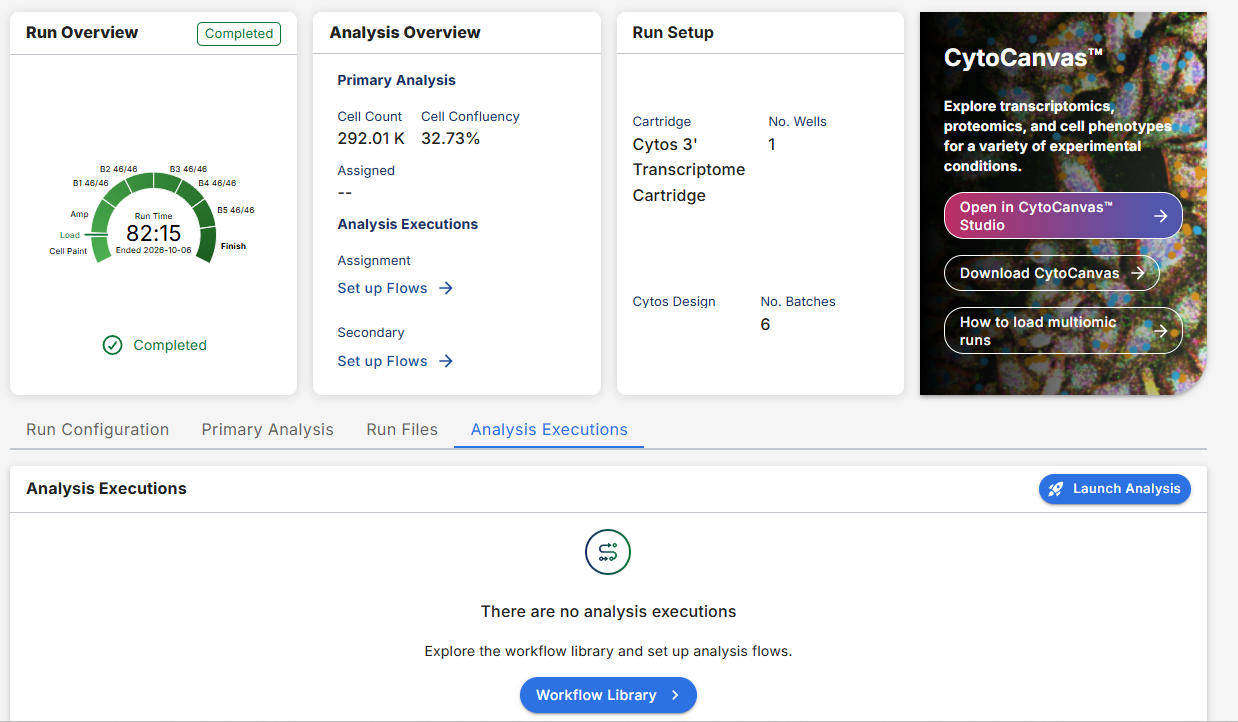
Open the Run Details page for the run, and then select the Analysis Executions tab.
-
Select Launch Analysis, and then select the flow. For the launch steps, see Launch a flow.
-
Wait for the execution to complete. The execution appears on the Analysis Executions tab with its workflow, flow name, status, and execution time.
-
Select the execution name, and then select the Output Files tab. The tab lists one folder for each workflow stage, which you can browse or download.
For the contents of each folder, see Output.
Inputs
The workflow requires an AVITI24 cell screening run directory. Optional inputs tune the analysis.
| Input | Description | Constraints |
|---|---|---|
| Run directory | An AVITI24 System cell screening run directory that contains RunParameters.json, RunManifest.csv, and Panel.json. | Required |
| Reference genome | Selected with the genome parameter. GRCh38 provides the genome FASTA, the STAR index, and the GENCODE release 47 annotation. | Optional; defaults to GRCh38 |
| Parameters | In addition to the run directory, parameters can tune the output. | Optional |
Input parameters
Arguments
| Field | Type | Title | Notes |
|---|---|---|---|
genome | string (enum) | Reference Genome | Default GRCh38; only GRCh38 allowed. Provides the FASTA, STAR index, and GENCODE release 47 annotation |
genes_gtf | file-path | Gene Annotation GTF | Optional; replaces the genome's GENCODE annotation with another GENCODE release on the same assembly. Release 47 validated |
segmentation_dir | file-path | Segmentation Directory | Custom cell segmentation dir passed to cells2stats (and bases2fastq when supported) |
c2s_tca_manifest_csv | file-path | Target Cell Assignment Manifest | Optional; falls back to run-directory manifest |
Advanced Settings
| Field | Type | Title | Notes |
|---|---|---|---|
filter_batch | string | Batch Filter | Comma-delimited batch list (e.g., B01,B02) |
tile | string | Tile Filter | Regex for selecting tiles (e.g., L1R..C..S.) |
OPS Alignment Tuning
| Field | Type | Title | Notes |
|---|---|---|---|
c2s_target_mismatch_threshold | integer | null | Target Mismatch Threshold | Range 0–4 |
c2s_specialized_targeted_min_query_length | integer | null | Specialized Targeted Minimum Query Length | Min 12 |
c2s_generate_specialized_targeted_bams | boolean | Generate Specialized Targeted BAMs | Default false |
Protein Tuning
| Field | Type | Title | Notes |
|---|---|---|---|
c2s_process_imaging_targets | boolean | Process Imaging Targets | Default false |
Output
The workflow writes one directory per stage into a folder named for the execution ID, such as wfr_123example123, in the flow's output location. The following tree shows key output files only. Each directory contains additional files, such as logs and copies of the run manifest, run parameters, and panel.
Representative view of Cytos Cell Screening workflow output
{execution_id}/
├── bases2fastq/
│   ├── Samples/{Well}/{Sample}.fastq.gz
│   ├── info/
│   ├── {RunName}_QC.html
│   ├── RunStats.json
│   └── run.log
├── cells2stats/
│   ├── CellSegmentation/
│   ├── Wells/
│   ├── qc/
│   ├── AverageNormWellStats.csv
│   ├── RawCellStats.csv
│   ├── RawCellStats.parquet
│   ├── RunStats.json
│   ├── SpecializedTargetedCounts.json
│   ├── TargetCellAssignmentManifest.csv
│   └── Versions.json
├── fastq2parquet_3prime/
│   ├── Samples/{Well}_{Batch}/
│   │   ├── alignment/
│   │   ├── bedgraph/
│   │   ├── metrics/
│   │   ├── picard/
│   │   ├── polonies/
│   │   └── samtools/
│   ├── feature_set/
│   ├── genes/
│   ├── ref/
│   └── RunStats.json
├── spatialdata/
│   ├── {run_id}.zarr.zip
│   ├── points-zarr.zip
│   ├── cell-shapes-zarr.zip
│   ├── nuclear-shapes-zarr.zip
│   └── cyto.viz
└── pipeline_info/
    ├── Provenance.json
    ├── software_versions.yml
    ├── execution_trace.txt
    └── execution_report.html
| Directory | Contents |
|---|---|
cells2stats/ | Cell segmentation masks, spatial coordinates, and per-cell statistics. |
bases2fastq/ | Demultiplexed FASTQ files and run metrics. |
fastq2parquet_3prime/ | Selected gene metadata, per-sample alignment and RNA metrics, combined and per-tile polony reads, and run-level aggregated QC statistics. |
spatialdata/ | The Spatial Data Object as {run_id}.zarr.zip, its shapes and points layers, and the CytoCanvas™ visualization sidecar. |
pipeline_info/ | Workflow provenance (Provenance.json: workflow, container images, resolved parameters), per-tool versions, and the execution trace and report. |